 scriptygoddess
Hit an interesting CSS thing today. A simple "float: left." A simple clear: both." Firefox understands it. Even IE 6 understands it. But what the heck is IE 7 doing??? See below.
Here is how Firefox and IE 6 render that page:
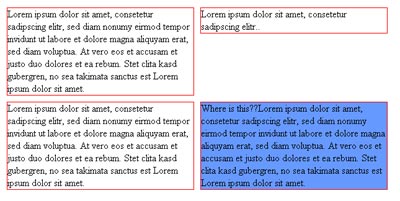
Here is how IE 7 renders it:

What's with the blue box moving around?? I was trying to avoid adding a lot of extra markup, so I made an additional class to clear the third div – thinking the next one would "top align" the following div to that one – like firefox and IE 6 do. But in IE 7, that last div is still floating left to the first few DIVs as if I never cleared that third DIV. The only way to *really* clear it is to add the extra markup of <br clear="all" />
See this example with the extra markup (you'll only notice the difference between this page and the previous one if you're running IE 7)
Anyone have any thoughts as to WHY? or how the extra markup can be avoided? I mean I know a simple <br /> tag isn't the end of the world – but I know adding those just for "layout" issues is "bad"™
(One request I'll make: when responding – if you're going to suggest a solution, please make sure that you've actually downloaded the sample and tested it there before making your suggestion. In the past I've had people suggesting things before they even tried it themselves to see if it'd work. Heh.) 🙂


